Sep 20, 2010

Plano Balloon Festival 2010

Here's a couple of nighttime photos from the Plano Balloon Festival in Texas. This is a great event - I didn't get up early enough for the morning launch, but I did catch the evening one. However, the best photo opportunities were during the "glow" after the sun went down. They let spectators walk amongst the balloons before clearing them out for fireworks. More shots at my Flickr set.

These were all taken with a Nikon D700 plus 24-70mm and 70-200mm VR lenses.
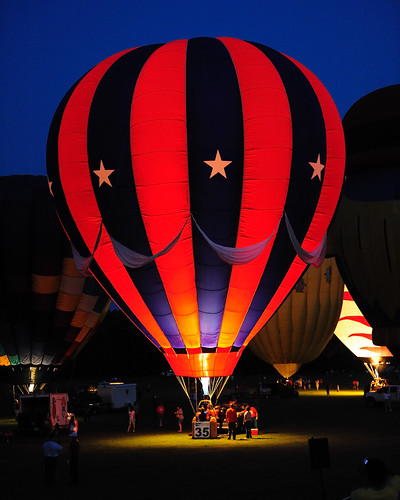

DSC_2135

DSC_2343

DSC_2326

DSC_2206

DSC_2157

DSC_2213

Mar 21, 2010

Nikon 70-200mm f/2.8 VR and VRII: Old Versus New

Nikon reinvented a classic when it developed the 70-200mm VRII. But how does it compare to the original?

The VRII is slightly heaver, and feels it since the barrel is wider. I appreciate the fact that the VRII is half an inch shorter as it fits better in my Lowepro Fastpack 250; the VRI was pushing the length dimension of my bag's capacity. Neither will fit with the hood installed but you can leave it reversed. By virtue of being shorter and wider, the VRII has less of a "baseball bat" feel to it when installed on a smaller dSLR like the D90.

On my DX camera (Nikon D90) it's hard to say that the VRII has improved image quality. They're both extremely sharp, contrasty lenses. Other reports are that the difference on FX is noticeable - the corners are supposed to be much better on the VRII.

However, autofocus and vibration reduction are noticeably improved on the VRII. These are features that you'll appreciate even even if you're shooting on DX. Plus, the VRII paves the way for a future upgrade to FX.

Overall, there's no question that the VRII is the lens to get if you have a full frame camera, and it's probably justified on a crop sensor camera as well. The picture below shows them side by side.

Mar 12, 2010

The best tailor in Dallas: Cantu Tailors

If you need a tailor who knows what he's doing, Cantu is the place. This is a great family run business that's been around for decades. Robert is always helpful and the prices are fair (yes, there are cheaper tailors, but you get what you pay for). Located in an unassuming strip mall, the storefront isn't much to look at but the work is always first rate.

(214) 739-3190
6064 Sherry Ln
Dallas, TX 75225

Mar 7, 2010

The rare light grey (white) Nikon 70-200mm f/2.8 VR

Traditionally white lenses have been associated with Canon, but Nikon has made a few "light grey" models over the years. One of the most recent was the 70-200mm f/2.8 VR, pictured below with lens hood and mounted to my D90.


It was an interesting novelty, but short-lived for me as a screaming deal on the new 70-200mm VRII came along. No word if they will produce a white 70-200mm VRII but I'm sticking with black. Although I certainly couldn't fault the image quality on DX:

Feb 25, 2010

Review: Tei-An restaurant in Dallas

We took a friend to Tei-An in the One Arts Plaza building for dinner a few weeks ago. It was truly an exception meal. We ordered the omakase (Japanese for "it's up to you") which they offer at $50 and $80 per person. The more expensive version (the one we had) includes more courses with additional ingredients. Started off with a bottle of unfiltered sake ("Nigori"). I can't describe every course in detail but this is what we had:
  • White seaweed salad
  • Sashimi - tuna, halibut, sea urchin with organic wasabi
  • Wagyu beef and duck on a hot rock
  • Baked halibut with pickled ginger and lotus root
  • Tempura shrimp and dragonfish
  • Pressed eel sushi
  • Curry soba
  • Tiramisu with green tea powder
  • Sesame mousse
  • Angel food cake with green tea ice cream
The courses progressed logically, from light to heavy. Don't order a 10 course meal if you're in a hurry - I think we were there about 3 hours. The service was excellent, attentive without being bothersome. Ambiance in the restaurant is low key but appropriate. There aren't many seats in the relatively small venue so reservations are critical. My only (admittedly minor) complaint is that the omakase didn't include even a small dessert course.

If you like Japanese food, Tei-An is the total package. Nearly flawless from start to finish (and for the price, it ought to be). And of course, any review of Tei-An would be incomplete without a mention of the heated toilet seats in the bathroom. Just be careful with the buttons you press on the control panel.

Feb 11, 2010

Review: The Bliptronic 5000

The Bliptronic 5000 is a cool gadget based on Yamaha's Tenori-On, a hybrid electronic musical instrument. Sure, less features than the Tenori-On but the Bliptronic costs only $50 instead of $1,000. Easy to learn but difficult to master. It's tactile, auditory, and visual. Plus, it has the potential to drive anyone around you crazy with its repetitive electronic bleeps. I recently gave one to a friend as a gift. I think it will help him achieve his lifelong dream of becoming Philip Glass and/or Steve Reich. Just make sure you include batteries.


Feb 3, 2010

Review: The Eco Cup Mug by DCI

I recently received the Eco Cup mug from DCI. Unlike the similar I Am Not A Paper Cup mug by the same company, the Eco Mug is single walled (no insulation) and holds 16 ounces instead of 10. Since it's solid porcelain, the Eco Cup comes with a silicone sleeve to keep from burning your hands - the mug gets hot, especially if you put it in the microwave. The sleeve does a fine job of protecting your digits. Overall I think the capacity of the Eco Cup makes it superior to the I Am Not A Paper Cup.

I bought this mug because the vast majority of travel mugs on the market are made of plastic or metal, and I haven't had good luck putting either of those in the microwave. I like my coffee hot, so by the time I drive to work, I'm ready to zap it for 30 seconds and bring it back up to operating temperature. The Eco Cup lets me do that. I've had several co-workers confuse the Eco Cup for a Starbucks paper cup until I thunked it on their desks - even empty, it's heavy.

Downsides: The white silicone lid can pick up coffee stains over time. You're not supposed to put the lid through the dishwasher, rather, you soak it in boiling water with lemon. That works okay but doesn't quite get all the coffee color out. The mug's capacity is listed at 16 ounces (in reality it holds closer to 14 unless you fill it to the brim) which is a decent amount but I wish it were a little larger. The mug is not insulated, so it won't keep your drink as hot for as long as a thermos if you're traveling away from civilization. However, since there's no metal or plastic in the mug, you can easily microwave it once you get to the office. The lid is not airtight so if it tips over, it will spill.

I like the Eco Mug and would recommend it to anyone who wants to be able to get their coffee extra hot in the microwave. Be careful to buy the mug made by DCI, and not one of the cheaper knockoffs that Amazon also sells.


Photo: Nikon D90 with 17-55mm f/2.8

Jan 30, 2010

Review: Lowepro Fastpack 250 camera backpack with photos

I returned the Kata 3n1-10 bag because it was just a little too small. I also realized that having the option to carry a laptop with me (without carrying a separate laptop bag) was valuable. So this led me to the Lowepro Fastpack 250, shown here behind a Nikon D90 with 17-55mm f/2.8 lens. Hopefully this brief review with pictures will give you a sense of the bag's size and layout in comparison to some common camera equipment.

This bag is a bit larger (mostly in width) and noticeably heaver than the Kata 3n1, given that it holds a lot more. The back has mesh padding which helps if you're sweating - this was a one nice feature that wasn't included on the Kata. Straps are thick and well padded.

Unlike the Kata, the Fastpack only has a quick access flap on the left hand side of the bag (from the perspective of someone wearing it). This makes sense if you're right-handed: slide off the right hand strap, pull the bag around with your left arm and pull the camera out with your right hand. Those wanting a flap on the right may prefer the Kata, since it gives you an option.

There's a flap with two quick release clips over the main camera/lens compartment, and a mesh pocket for water bottle on the right side. Underneath the flap, there's a slim zippered pocket which could hold filters or something else that's fairly flat.

Inside the main compartment, you can see the D90 with 17-55mm attached (no hood) and immediately to the right of it, the Nikon 12-24mm f/4. If I took the 12-24mm out, I could fit the 17-55mm with its hood attached. The D90 doesn't fill up the space for the camera body - I wish it were a little more snug but they've allowed room for larger FX bodies as well as DX bodies with a grip attached. Above that there's a narrow compartment that could hold a couple flashes, but for now I just have the battery charger and AC cord on the left and the lens hood for the 12-24mm on the right. Below, I've setup a divider between my 35mm f/1.8 on the left and the 18-105mm VR on the right (with lens hood attached). The dividers are sturdy and the compartment is well padded on the outside - equipment would be well protected here.

This photo shows my Dell Latitude D630 sliding in to the laptop pocket. This laptop only has a 14" LCD so there's a fair amount of extra room (the bag is rated for a 15" LCD). Even without a computer, you could throw some books or magazines in there.

The top section has a small zippered pouch on the outside. Not a whole lot of room in there.

The flap on the top section is not very well padded compared to the bottom section; I wouldn't put any optics or sensitive electronics in here. But there is plenty of room for other accessories, maps, lunch, etc. I've shown it with the 17-55mm for a sense of scale.

Overall, I like this bag. I could see that I was going to outgrow the Kata 3n1-10 very quickly, so this is a better solution for storing and carrying my gear. The 3n1-20 is probably closer in size to the Fastpack 250 (Kata also makes a model with a laptop compartment the 3n1-22) but I don't see the utility in having a sling bag option for a bag of that size (that much weight on one shoulder is not going to be comfortable for any length of time). Also, I felt that the clips and zippers on the Kata were not as easy to use as I expected, so I opted for the Fastpack instead. The only downside is that once you get it loaded up with gear (especially a laptop), it gets really heavy - not the sort of thing I would want to take an all day walking tour with. However, it'll get all your gear on the plane, and you can leave what you don't need for that day in the hotel.

Jan 28, 2010

Complaint: Progressive Homesite Homeowners Insurance

Summary: avoid Homesite Insurance like the plague.

For the last three years, our house in Dallas, TX was insured for about $200k. First with Amica, and more recently with Progressive's affiliated homeowners insurance company: Homesite Insurance. Everything was fine until we got our renewal bill for 2010 and Homesite had increased our premium about 50%. We've never had a claim. I looked at the premium detail and it turns out they had increased our home's replacement cost from $200k to $300k, and this increased the overall premium.

I called Homesite for an explanation as to how a home's replacement cost could increase by 50% in a single year. They said they had switched to new software and this is the estimate that it had generated. I told them that the market value for this house is around $200k and there is no way you could build a house on this lot for $300k. Their software put our home's replacement cost at about $150/sq. ft. when in fact, new homes are being built in our area for $100/sq. ft. Our house hasn't had any renovations or upgrades that would increase its value by 50% in the last few years. I told Homesite that we didn't want to purchase $300k of insurance for a house that could be replaced for $200k. They said we had no choice but to accept their appraisal.

I then called the Texas Department of Insurance to file a complaint against Homesite. I wanted to see a report from a licensed appraiser or builder who would sign his name to a report stating that our house would cost $300k to rebuild. The TDI said they would investigate and contacted Homesite. A few weeks later we received a letter from Homesite that repeated what we were told on the phone. They provided the detail of the $300k replacement cost, but the largest single line item was "Other/Misc" which was $70k. That was the level of detail they provided. This kind of "estimate" borders on fraudulent to my mind.

TDI later sent us a letter stating that Homesite can use any replacement cost they want. Who am I to argue with the Texas Department of Insurance? So we cancelled the policy and went to another insurer who gave us a $200k replacement cost estimate and a much lower premium. The new insurer suggested that Homesite may not have been able to get a rate increase past the regulators, so instead they're just jacking up everyone's insured value to increase their premium revenue.

Now, I fully understand that my homeowners' insurance premium will probably increase from year to year. I also understand that my home's replacement cost will also increase over time due to inflation. But for Homesite to think that any homeowner should accept a 50% increase in replacement cost in one of the worst housing markets in decades is ludicrous. I guess they haven't noticed that demand for home building services isn't exactly in high demand right now.

We still have our auto insurance with Progressive from when we switched to Homesite, but I'm going to look around for a better rate on that as well. If Progressive wants to associate with Homesite, neither company deserves my business.

Homesite Home Insurance: the worst homeowners insurance company in Texas.

Jan 23, 2010

Review: AF-S DX Nikkor 16-85mm f/3.5-5.6G ED VR

This lens is considered by many to be a potential upgrade from the 18-105mm VR that comes in the Nikon D90 kit. On paper, it has several advantages:
  • Better build quality with metal lens mount (18-105 has a plastic mount)
  • Second generation VR technology
  • Slightly wider field of view (2mm doesn't sound like much, but it's actually 7 more degrees in your field of view)

However, you give up some reach on the tele end, and the 16-85 costs almost twice as much as the 18-105 (the incremental cost is even more if you consider that the 18-105 costs about $200 in the D90 kit, and if you already have the 18-105 you'll have to sell it on eBay or Craigslist). Expectations for image quality from the 16-85 run high given its price, and the lens is generally well reviewed. However, I did an informal test of the 16-85 against the 18-105 over their common range and found that the 16-85 was sharper from edge to edge at close focus distances (less than 30 feet) on the wide end. However, for shots at 85mm with focus distances greater than 30 feet, the 18-105 was noticeably sharper. My informal test shots were taken at the same aperture and shutter speed in outdoor lighting conditions. At 100% crop, it was easy to identify the 18-105's shots based on the center of the frame, and things worsened at the edges. This was really surprising to me and not at all what I expected, but I ended up returning the 16-85. The relatively high price of this lens could've been justified based on its features, but I was unwilling to spend more money for lesser image quality. Ultimately, if the wider angle is what you're after, you'd be better served by buying the Nikon 12-24 f/4, which can be had for about $500 on the used market.

Jan 9, 2010

Review: Kata KT D-3N1-10 sling/backpack camera bag with photos

I recently purchased the Kata 3n1-10 camera bag to hold my burgeoning collection of camera equipment. I originally started looking at the Lowepro Slingshot but came to realize that a sling bag with a body plus multiple lenses puts a lot of weight on a single shoulder. Okay for short periods but not all day walking. The Kata converts between a two-strap backpack and a single strap over-the-shoulder sling bag but I expected to use it in backpack mode most of the time. Here's the 3n1-10 next to the D90 and some lenses. Hopefully this brief review with pictures will give you a sense of the bag's size and layout in comparison to some common camera equipment.

Back of the 3n1-10. For sling use, you connect the red strap to the red hook. It can be reversed for left handed individuals as well.

Inside, there's a fair amount of room, but it's the smallest of the 3n1 series, so even with my gear the fit is tight. From left to right in the photo, you can see the 35mm f/1.8, D90 with 12-24 f/4 and lens hood, and the 18-105VR with lens hood. One improvement would be to extend the zippers an inch to the left as it can be difficult to reach lenses stored on the left hand side of the bag - this is a real annoyance. The bag came with a couple more foam dividers but I've taken them out for the time being as it was just too cramped. The quick draw feature works well although I'm not sure yet if it would fit the D90 with the 17-55mm or 70-300mm VR mounted. Probably possible but a close fit.

There's two side pockets next to the top compartment. They might barely hold the 35mm f/1.8 but clearly they're designed for smaller accessories.

The top compartment is as well padded as the rest of the bag and I have no reservations about storing a lens in that section. You can see it here with the 18-105VR for scale.

Overall the bag is well designed, solidly built, and comfortable. The bright yellow interior is a nice touch. As you can tell from the photos, it's a relatively small bag so if you have more than a couple lenses, you'd be better served by the 3n1-20. Don't even think that you could get a lens like the 80-200 f/2.8 into the 3n1-10. However, for a light travel bag, it's not bad. Ultimately I ended up returning the 3n1 because the single-strap mode just wasn't practical for a bag of this size. It's caught in the middle - too big to be a good sling bag, too small to be a useful backpack. Another issue was that the zippers didn't feel as smooth as I expected for a bag of this price, and was concerned that they would jam over time. Plus, there's no reason this bag needs to have 4 quick release clips on it - they almost defeat the purpose of having a quickdraw flap in the first place. I thought about trying the 3n1-20, but instead I ordered a Lowepro Fastpack 250. We'll see how it works out.

Dec 30, 2009

Review: Nikon AF-S DX Nikkor 35mm f/1.8G

Maybe you just got a Nikon D90 or D5000 for Christmas. Sure, the kit lenses are fine (especially the 18-105 VR), but the whole point of a dSLR is that you're not stuck with one lens. And you've probably noticed that trying to take indoor shots in natural light (no flash) with the kit lens, even at high ISO, is nigh on impossible. Enter the Nikon 35mm f/1.8. At $200 this is one the finest, cheapest lenses you can buy. Indoor shots, especially portraits, have a richly saturated look. Subject isolation is easy at f/1.8 and the bokeh is quite pleasing. Although 35mm (~50mm effective FX focal length) is a little short for a traditional portrait lens, this will one will get the job done if you're just starting out. The 35mm is a lot more versatile than the 50mm f/1.8 for shooting indoors unless you want extreme close ups. The lens is a compact, lightweight alternative to the kit lens and is handy for times when you want to bring your camera along without a lot of fuss.

Be aware that there's a learning curve with this lens. At f/1.8, depth of field is extremely narrow, so there's no room for focus error. And if you're trying to shoot more than one person, stop down to f/2.8 or else you probably won't get the sharpness you're after. Although f/1.8 is a big step up from f/3.5, this lens still won't see in the dark. There are some cases where you really just need a tripod and a longer exposure than you can handhold. If you're used to shooting with a zoom, it takes a little while to get comfortable with a prime. But it's easy to take a step forward or backward (or just crop in RAW). A fixed focal length forces you to think more carefully about composition, but it's also somewhat liberating in that you can just take the shot without having to worry about the zoom. Overall, the Nikon 35mm f/1.8 should be the first new lens you buy for your new dSLR.

Dec 29, 2009

Buying a camera lens on Craigslist

Once you get out of the consumer zooms, Nikon charges a mint for its lenses, especially the fast glass with f/2.8. Even if a lens isn't designated for the pros can still retail above $1,000. Fortunately, there's some good deals to be had on Craigslist, if you know what to look for and how to deal with sellers there. People get excited with a new camera and buy more lenses that they know what to do with. Eventually they realize that all the pieces of glass sitting in the closet are worth some real cash. Personally, I'd rather buy lenses of Craigslist than eBay, as you can get your hands on the merchandise before you commit the cash.

Finding Your Lens

Craiglook is a great resource for digging through Craigslist because it lets you expand your search beyond Craigslist's default search radius.

Negotiating

I'd rather get this out of the way by email or phone before meeting in person to avoid wasting everyone's time. Craigslist sellers tend to have an inflated view of what their lens is worth. While it's true that Nikon glass holds its value very well (especially compared to third-party manufacturers like Tamron, Sigma, and Tokina), it's still a used product that will sell for a substantial discount. Check eBay and KEH for pricing indications. The seller's price needs to be below comparable eBay transactions, because eBay/PayPal/shipping fees (which are paid by the seller) can easily amount to 10-20% of the sales price. Sometimes the seller doesn't know what they're selling, and has overestimated its value. For example, there are 5 versions of the Nikon 80-200 f/2.8 lens. The version made in 1988 is worth a lot less than the version that's currently being produced.

Meeting

Find a neutral location - Starbucks works well - to meet. It's unlikely that someone's going to rob you, but since you're carrying a large wad of cash, why take the chance? I wouldn't meet at someone's house, nor would I want them coming to my house. There's just no reason to risk it.

Inspecting a Used Lens

  • Does the case have scratches or dents?
  • Are the zoom and focus rings smooth?
  • Check the autofocus and vibration reduction switches.
  • Check the front and rear glass elements for scratches.
  • Hold the lens up to the light and open the aperture, then look through it. Is there dust in the lens? Depending on the age of the lens, a little dust is ok. If you see lines or haze across the optics, sort of like a spiderweb, that may be mold or fungus, which is a serious problem. I'd avoid any lens with potential mold issues.
  • Check the aperture control with your hand - when you open the lens to full aperture, does it spring back to minimum aperture quickly?
  • Pop the lens on your camera and test it out. Does AF work? How about VR? Do you hear any strange noises from the AF or VR?

Keep in mind that if you ever plan to resell the lens, it'll be worth more with the original box and papers. The warranty papers are nice, but Nikon USA's warranty is non-transferable, so if you need repairs in the 5 year warranty period, you'll have to have the original buyer send it in. Also remember that non-US (gray market) lenses aren't accepted by Nikon for repairs if you ever need service, regardless of who owns the lens. Generally, the serial number on all US warranty lenses should start with "US" before the numbers.

Does it Work?

Yes - if you're patient. You have to do your homework on pricing and you'll probably have to walk away from several deals before you find one that works. For example, I was recently in the market for the Nikon 12-24 f/4 wide angle zoom. Amazon sells it new for $999 and used copies on eBay sell for $550-$600. I picked up a copy on Craigslist for $500, still in the box and didn't look like it had ever been used. If I ever decide to get rid of it, there's no question I can get my money back, so it's a low risk investment.

Dec 19, 2009

Review: Tamron AF 17-50mm f/2.8 SP XR Di II VC Zoom Lens for Nikon

I had five minutes to play with a sample of the new Tamron 17-50 lens at the camera store today. Here are my impressions based on test shots with my D90. The VC (vibration control) seems to work quite well, at least on par with Nikon's VR (vibration reduction). I was able to get sharp handheld shots down to 1/10th. I didn't try it at any slower shutter speeds but expect it would help out there as well. Autofocus is relatively quick, I can't say that it's as fast as my Nikon lenses but it certainly wasn't slow. The lighting in the store was ok, not great, but not extremely dark, so it's possible the lens would hunt more in adverse conditions. Build quality was decent, not on par with the Nikon 17-55 f/2.8 but certainly not flimsy. Lens felt well balanced on the camera smooth action in the zoom and focus rings. The big disappointment was image quality at f/2.8 - there was a lot of smearing of bright colors in high contrast areas. I've posted a couple of 100% crops below - check out the transitions between white and yellow to black to see the problem. These shots were taken at ISO 200, 50mm, 1/30th, VC on, RAW with no postprocessing, JPEGs exported from Capture NX 2 (full EXIF information is included). I didn't test anything other than f/2.8 because if you can't shoot wide open, why buy a fast lens in the first place? I expect that this problem diminishes as you stop down. Ultimately, I wouldn't recommend this lens based on image quality as observed below. At ~$650, it's less than half the price of the Nikon 17-55 but I still wouldn't call it cheap.


Dec 17, 2009

Review: Nikon AF-S DX Nikkor 18-105mm f/3.5-5.6G ED VR

This is the kit lens that comes with the Nikon D90, usually at a premium of about $200 over the stand alone camera body. Or you can buy it separately for about $350. If you're wondering whether to buy this lens as part of the kit - go for it. This lens is a bargain for only $200 and a great way to start out if you're new to dSLRs. Focal length range covers just wide enough to get the entire Thanksgiving table in the frame to enough zoom for close up shots outside. Shoot with this lens for a couple months and you'll have a sense of whether you want to invest in the wide (11-16, 12-24mm) or the tele (80-200, 70-300mm) for your next lens. VR is handy, provides a significant improvement for handheld shots at low shutter speeds. Admittedly, build quality could be better - I'm not a fan of the plastic lens mount. But it does keep the weight down. Autofocus is fast. Image quality overall is very good, photos are sharp across the frame with a little distortion at 18mm and slightly less detail along the corners, but you'd only notice this at 100% crop. I have noticed that outdoor shots in direct sunlight tend to be about half a stop overexposed, but this is easy to correct. In total, this lens is a great value and the low price doesn't reflect the high quality shots you can take with it. Highly recommended.

Dec 16, 2009

Review: Nikon D90 dSLR

After using this camera for the last few months, there's no doubt in my mind - the D90 is a great camera and a terrific entry to the world of dSLRs. Image quality is outstanding - 12MP gives you enough flexibility to do substantial cropping and still print or display at large size. The dynamic range provided by the sensor is a thousand times better than point and shoot cameras; it's almost like shooting with film. Finally, you don't have to choose between crushed blacks and blown out whites! The camera just feels right in your hand, with all the controls where you'd expect them to be. Well-balanced and solid, but not so heavy that it's a chore to bring with you. Low light performance is top notch. You can't see in the dark (yet) but results at ISO 1600 are definitely usable, maybe even ISO 3200 for prints below 8x10. The camera gives you a lot more latitude to work with natural light and avoid the stunned, washed out look of flash photography.

Downsides? Not many. Video is one feature that still needs some work - I wouldn't expect much from it. Trying to manual focus while shooting is an acquired skill that takes some practice. Plus, rapid panning results in the infamous "jelly motion" effect because the camera's sensor isn't designed for video. You could buy a $300 camcorder that would take better video and audio. Another feature that falls short is live view - shooting through the LCD. Yes, it works, but the autofocus is extremely slow compared to viewfinder focusing. Presumably you bought an SLR because you wanted a viewfinder, so don't let this hold you back.

Compared to the D5000? Yes, the D5k provides the same image quality and low light performance as the D90. And it's slightly cheaper. If you're not upgrading non-AF motor Nikon lenses, the D90's built in motor is of little value. But I found the D5000's flip LCD to be impractical given how slow live view focusing is, and if you compare the cameras side by side, the resolution of the D90's LCD is immediately apparent. Another more subtle difference is in the viewfinder. The D90 has a larger, brighter viewfinder which makes composing and checking focus much easier, especially in low light conditions. The D5000's 18-55mm kit lens is no match for the D90's 18-105mm VR Nikkor, which is easily worth the $200 premium for the camera bundle (as compared to buying the body without a lens).

Dec 15, 2009

Digital camera: upgrading from point and shoot to dSLR

I gave the latest point and shoot digital cameras (Canon S90 and Panasonic LX3) a shot but neither one could justify its $400-500 price. My next thought was the Panasonic GF1, a promising new entry in the micro four-thirds format. Despite being released a couple of months ago, Panasonic doesn't seem interested in actually shipping any GF1s to the US, as they are on backorder for at least a month from any legitimate retailer. What's the point of buying a new camera if it's not going to be delivered until after Thanksgiving and Christmas are over? Which left me with only one option: the Nikon D90 with 18-105mm lens.

After using the D90 for a couple of weeks, I can recommend the upgrade over a point and shoot without hesitation. However, it should be noted that a dSLR isn't just a P&S on steroids - it actually takes some thought to get great pictures out of a dSLR. Don't have to be a rocket scientist, but it helps if you understand the basics of exposure, focus, aperture, and shutter speed.

Nov 1, 2009

Digital Camera Review: Canon S90 versus Panasonic LX3

I recently had the chance to play with both the new Canon S90 IS and its competitor, the Panasonic DMC-LX3. As far as picture quality and low light performance are concerned, they are the two finest point and shoot cameras on the market today. But which one is best? Unfortunately, there's no clear answer to this question, which depends on the features you're looking for. My impressions are based on JPG output from both cameras, there might be additional benefits from RAW post-processing.

S90 strengths
  • Size and weight: thinner, with fewer angles and odd protrusions, so it's more likely to fit in your pocket.

  • LCD: brighter, and seems slightly larger when shooting in 4:3 mode (due to wider format of LX3's LCD).

  • Controls: control rings are not perfect but allow for quicker, more intuitive settings adjustment compared to the LX3's joystick. I especially like the control wheel on the back of the S90, even though some have complained that the wheel is too loose, I never found this to be a problem.

  • Low light performance: I had much better luck getting properly exposed photos in low light with the S90, although you do have to keep an eye on the ISO as it doesn't take much to introduce a fair amount of noise. The S90 does apply a fair bit of noise reduction to low light shots, so although noise is not as noticeable as the LX3, the S90 has reduced detail. I didn't test either camera with noise reduction software (e.g. Noise Ninja). Even at higher ISO settings, I had trouble getting the LX3 to take a usable photo of a street at night lit only by streetlight, while the S90 picked up on it right away in aperture priority mode.

  • Lens cap: the S90 has none. Instead it uses automatic shutters to protect the lens. The LX3's manual lens cap is a minor annoyance, but an annoyance nonetheless (one more thing to lose).
LX3 strengths
  • Lens: 24mm versus the S90's 28mm provides a wider and more useful field of view for architectural or landscape shots, although there is a lack of sharpness at the edges if you look closely.

  • Daylight performance: the LX3 has the edge here due to the S90's tendency towards chromatic aberration (purple fringing around high contrast areas, which is the same problem my 5 year old Powershot S410 has - not sure why Canon hasn't fixed this yet).

  • Aspect ratio: LX3 offers 4:3, 16:9, and 3:2 (my preference is for 3:2) shooting modes without cropping or changing the field of view. The S90 allows you to shoot in the same ratios, but does this by cropping the 4:3 image, which is just throwing away image data.

  • Video: neither camera will satisfy a video enthusiast, but the Lx3's 720p video is the standard these days. There's no reason the S90 had to be hamstrung by VGA resolution (640x480) video, as HD video has been featured on much cheaper cameras for a while.

  • Flash: I don't like the tendency of the S90's flash to automatically pop up where you're holding the camera. The LX3's pop-up flash has a switch to release it - much better.

  • Build quality: The LX3 feels solid. The S90 doesn't feel flimsy, but lacks the LX3's fit and finish.
Tied
  • Image stabilization: I got usable shots down to 1/2 second exposures, but not reliably from either camera. IS is definitely helpful but not a miracle.

Conclusion: Both cameras are excellent. However, I didn't find that either one represented a quantum leap forward versus my old Canon Powershot S410, not enough to justify +$400. So a Nikon D90 DSLR (or possibly the new micro four thirds Panasonic GF-1) is my next stop. And it's really a shame that Canon couldn't make the S90 clearly superior versus the LX3 given that they've had a entire year to refine their product.

Oct 23, 2009

Canon S90 Review

Canon released the S90IS digital camera in October 2009, and as I was looking to upgrade my 5 year old camera, decided it was worth a shot. I picked it up at Best Buy for list price of $429 less a 10% coupon and a $20 Canon loyalty rebate for a total of $397 including tax, plus $32 for a 16gb SDHC memory card. The following are my impressions after using the camera for a week.

Pocketability

A big selling point of this camera is its size. Although not as small or as light as some of the most miniature SD-series PowerShot cameras, the S90 should fit comfortably in almost any pocket with its smooth edges. Minor annoyance: the wrist strap does not have a size adjustment on it, so you can’t tighten it around your wrist. This piece of plastic probably costs less than a cent and ought to have been included.

Screen

The 3.0” LCD is bright and sharp. All information is displayed prominently without getting in the way of the image. As the screen sits flush with the camera back (it is not recessed at all), I recommend applying a screen protector to prevent scratches. The optical viewfinder is a welcome omission on the S90 – they are so small on point and shoot cameras as to be functionally worthless, yet they add to the camera’s size and weight.

Controls

At first I found the front control ring a little awkward, as you can’t get a grip on it in quite the same way that you would an SLR lens’ focus ring, nor does it turn smoothly (it clicks in place at each stop). Another is that once you’ve used the control ring to adjust your settings, you have to move your hand back to the camera’s body to hold it prior to taking the picture. For making quick adjustments, I prefer the rear control ring located next to the LCD. It turns smoothly and you can move it with your thumb while your finger is on the shutter. Fortunately the camera lets you quickly reassign the control wheels using a button on the top of the camera. The camera gives you a wide degree of freedom to adjust its settings and the controls make it possible to quickly adjust shutter, aperture, white balance, and ISO. Sure, you could leave it in Auto and get decent pictures, but you’ll be missing out on this camera’s potential to deliver great shots.

Lens and Image Quality

Other websites have posted more detailed test shots than I ever could so I’ll leave that to the professionals. However, I will say that my unscientific tests indicate that image quality is very good, not DSLR level but getting close. The camera really shines in low light due to the f2.0 lens and image stabilization. You do have to keep an eye on the ISO, however, as noise starts to creep in above 400, although shots are usable up to 1600. The camera starts up quickly, the lens pops out, and it’s ready to shoot in less than a second. The 28mm wide angle view is a nice step up from my old camera’s 36mm lens, but I do wish it were a few degrees wider, as Panasonic and Samsung now offer cameras at 24mm and 25mm. I ran software called ExposurePlot on all of my old photos and it revealed that I use wide angles for about 80% of my shots, with mid-range and zoom for the rest. As is standard on most compact cameras today, the lens is protected by automatic shutters. Autofocus is fast and shutter lag is minimal. Unfortunately, there are no threads for adding filters or a wide/zoom lens adapter. The S90 supports shooting in RAW and comes with software (Canon Digital Photo Professional) to interpret its RAW output. I am not very familiar with editing RAW files, so I’ve set the camera to record RAW+JPEG files.

Build Quality

The tactile sensation of the camera in your hands is decent but could be slightly better. The front of the camera is metal (aluminum) but the top and bottom are plastic. A common problem is that there is a tiny amount of flex or a clicking noise when you hold the camera by the upper left corner, behind the flash. At 7.0 ounces with battery and memory card, Canon has obviously tried to keep weight down, but the camera feels slightly less sturdy as a result.

Flash

The flash automatically pops up when necessary and retracts if you turn it off. The flash location is a little bit uncomfortable since that is naturally where I would put my left hand to hold the camera. I would've preferred that the flash was built in to the casing rather than popping up, as it can be startling if your finger is in the way when it opens (or closes). I can't comment on the actual quality of the flash at this point - but then, one of the main reasons to get this camera is that you shouldn't need to rely on the flash as much as one with a slower lens.

Sample Photos

I don't have any shots worth posting yet, but a good source is the Flickr S90 Users Group.

Video

It's doubtful that anyone buys the S90 for its video features. The S90 only offers video at standard VGA resolution (640x480) when HD video (720p) has become the standard. Additionally, no zooming or focus adjustment is possible while recording video. If you want a camera with a better balance of still image and video recording features, I'd recommend the Panasonic DMC-ZS3.

Extreme Conditions

An inexpensive option for rain/snow/sand/underwater shooting is the Dicapac WP-410 waterproof case, available for about $30 (much cheaper than the Canon underwater housing). It’s sort of a Ziploc bag on steroids. They have several models but this one seems to fit the S90 just fine. Note that you may have to zoom in from 28mm to avoid vignetting with the case.

Competitors

Panasonic's DMC-LX3 is clearly Canon's target for the S90. Released in 2008, the LX3 quickly became a favorite of photographers looking for above average quality in an affordable point and shoot package. A year later, the LX3 is still in short supply and often sells out at MSRP (potentially indicating poor supply chain management at Panasonic). The LX3 offers an uncommonly fast (f2.0) and wide (24-60mm) angle lens and a 1/1.6" sensor allowing for greater low light performance. The S90 responds with a slightly less wide lens, although more zoom (28-105mm), and a 1/1.7" sensor. Image quality comparisons between the two cameras are subject to much scrutiny, but neither camera seems to have a clear advantage. Some argue that the LX3 has more detail while others are enamored of the S90's color. With an extra year of R&D under their belts, one has to wonder why the S90 lacks some of the LX3's features, such as 720p video, that have become standard on cheaper cameras. And why doesn't the S90 have a clear lead in image quality? On the other hand, the S90 is small enough that you could forget that you have it with you, while the LX3’s size pushes the boundaries for a “pocket” camera. And many lament the LX3’s use of an old fashioned manual lens cap.

As mentioned above, a slightly cheaper option than either the S90 or LX3 is the ZS3, which offers a nice wide angle lens (25-300mm) and better video recording features. However, you will trade off some image quality for your still photos, especially in low light.

Conclusion

Is the S90 the perfect camera? No. I have a few minor things that I would change if I could. But it is an excellent camera, one of the best currently on the market if you’re looking for image quality, low light performance, versatile focal lengths, and manual controls in a compact form factor. Sure, you can find smaller cameras, and you can find cameras with better image quality (micro four-thirds comes to mind) but overall the S90 is a terrific balance between the two. Highly recommended if you’re looking to move beyond the ordinary point and shoot snapshots but don't want to lug a DSLR around.

Aug 22, 2009

Is your MBA tax deductible?

A recent article (PDF) in the Georgetown Law Journal explores the ambiguity surrounding deductibility of expenses associated with a MBA program. Generally, educational expenses which qualify the taxpayer for a new occupation are not deductible, but normal and ordinary expenses in your line of business are deductible. There is some interesting examination of the regulations and court cases where this issue has been challenged, and the author concludes:

Although the line of Tax Court cases considering the deductibility of MBA related tuition expenses may at first appear to be a confusing and winding maze of inconsistency, more careful inspection reveals that—in most cases—the courts probably got it right. For the most part, MBA students at elite schools who attempted to take enormous tax deductions for career-transforming educational experiences were turned away, whereas those toiling away in an effort to improve their established business skills while continuing to work full-time were permitted to take their deductions. In short, at the end of the day it appears as if the courts generally muddled through the cluttered, outdated mess that is Treasury Regulation § 1.162-5 and came out with the right answers.