Nov 7, 2011

Review of Pie Five Pizza in Irving

Does America need another pizza chain? Pie Five Pizza Company, a wholly-owned subsidiary of Pizza Inn Holdings Inc., seems to think so. I received a buy-one-get-one-free postcard from their new location in Irving and headed over.

It helps to imagine Pie Five as a Subway for pizza, because that's exactly what it is, down to the assembly line addition of banana peppers and olives from behind a glass sneeze guard. The pizza is done in less than five minutes and it's priced at a flat rate, regardless of how many toppings you choose. The optional salads are all pre-assembled in recyclable plastic containers, same as the dressing packets.

We had two pizzas - one thin crust with vegetables, the other a regular crust with all the meats. The verdict? Not surprisingly, this tastes like a pizza made by Subway. Not offensive, but without any real positives either. I didn't taste anything that would set this pizza apart from what you'd get at Pizza Hut. So while I wouldn't mind eating here for lunch, there's not much that would draw me in either - it's just your ordinary fast food. When I want really good pizza in Irving, I'll stick with Cavalli's.

Here's a couple of Pie Five pizza photos, taken with a Sony Nex-5N and a Voigtlander 35mm f/1.2 ii.

DSC00430

DSC00429

Nov 6, 2011

Nex-5N and the Voigtlander 35mm f/1.2 ii Review

The Sony Nex-5N has decent high ISO capabilities but it's not in the same league as full frame cameras like the Nikon D700, so fast glass is critical for available light shooting. The new Voigtlander 35mm f/1.2 ii fits the bill when you add a Leica M-mount adapter. It adds some weight but is still a very compact package; here's what it looks like on the 5N:


Manual focus with this lens at f/1.2 takes some practice as the depth of field is razor thin. But when you hit the focus just right, sharpness is surprisingly good, even wide open. Color and contrast are excellent and chromatic aberration is well controlled. Here's a few sample shots:

DSC00414

DSC00419

DSC00438

Nov 5, 2011

Nex-5N and 16mm f/2.8

The Sony Nex-5N and 16mm f/2.8 lens are a portable combo that delivers solid picture quality without a flash, and still fits in your jacket pocket. A couple of sample shots from the Dallas Symphony Orchestra at the Meyerson. There's a few more photos if you click through to the flickr set.

DSC00344

DSC00361

DSC00338

DSC00339

Nov 4, 2011

Nex-5N and Rokinon 85mm f/1.4 (Nikon mount)

The Rokinon 85mm f/1.4 is a cheap, fast lens with very good image quality; the only thing it lacks on Nikon bodies is autofocus. This is less of an issue when you adapt it to the Sony Nex-5N. Here's a size comparison with the kit 18-55mm lens. The Rokinon isn't a huge lens, but with the added bulk of the Nex-Nikon adapter,


I picked up a used copy of the Rokinon for $150 - it feels solid and the focus ring is well dampened. This isn't a full review, but my initial impression is that the lens represents a tremendous value given the image quality and low light performance it can deliver. Manual focus takes some practice but isn't too bad given the Nex's focus peaking and MF assist. Below are a couple of shots taken with the Nex and the Rokinon wide open.

DSC00270

DSC00269

Nov 3, 2011

Nex-5n Review - Initial Reactions

I took my new Sony Nex-5n with the kit 18-55 lens out to shoot a family birthday party a couple of weeks ago. Here are my initial thoughts.

I was shooting indoors with moderately poor lighting. Focusing was relatively quick although it did get fooled a few times when there was strong backlighting from a row of windows along one wall. The automatic focus point selection wasn't bad but wasn't great either - I need to set this on using the center focus point and then recompose.

I shoot in raw - many photos at ISO 3200 were perfectly usable for my purposes (screen and small prints) with a little noise reduction in Lightroom. The kit zoom gets to f/5.6 pretty quickly so it wasn't optimal for indoor, ambient light shooting.

The flash was a disappointment - I tried the fill flash setting but everything I got was way blown out. I haven't had time to tweak this but maybe there is a setting I'm missing. Otherwise they're going to need a firmware update as the flash is close to unusable.

Auto white balance in the camera was ok, but most of the photos benefited from some WB adjustment in Lightroom.

The camera handles very well. Tilting the screen out to shoot from the hip is a nice feature, as is the touch-to-focus.

Oct 18, 2011

Nex-5N and 18-55 versus 55-210 size comparison

I haven't had time to shoot with it yet, but here's a photo to compare the size of the new Nex E-mount 55-210mm lens on the Nex-5N next to the 18-55mm kit lens:

Oct 17, 2011

Nex-5N dimensions of tripod mount

Here are three photos with a ruler showing the base of the Sony Nex-5n and its tripod mount. The mounting area is oddly shaped - the bottom of the camera juts out like an isosceles trapezoid. This makes the base of the camera even with the lens when you set it down on a table, but also reduces the surface area for friction with a tripod plate.


Oct 16, 2011

Nex-5N size comparison with a Nikon AI-S lens

Here's a photo showing the Sony Nex-5N with the 18-55 kit lens next to the Nikon 135mm f/2.8 AI-S manual focus lens. I'm still waiting for my f-mount adapter to try this combo out.

Sony Nex-5N Mini Review

I just got my Sony Nex-5n camera with the 18-55mm kit lens. So far I’ve only used it for shots in iAuto (intelligent auto) mode but I like it. Here are a few early impressions. The camera turns on quickly and is ready to shoot in less than 1 second.

Autofocus is pretty fast in good light, perhaps a hair slower than a DSLR but not slow. The touch screen allows you to lock focus on a particular object as you compose the shot. I haven't tried continuous focus tracking or manual focus yet.
The in-lens image stabilization works well and allows for shutter speeds below 1/10 second if you use good technique. High ISO shots up to ISO 3200 are no problem – you start to lose some detail but the JPEG noise reduction is pretty good and you can get better control if you shoot RAW. Adobe Lightroom 3 supports the Nex's RAW files. Overall, image quality is quite good with the kit lens. The zoom ring is firm and smooth (no creep). The flash is not great as it tends to overexpose. I need to figure out how to dial in the flash exposure compensation by -2/3 EV.

The interface is good - the touch screen is very responsive (close to an iPhone 4, but no multi-touch) and exceptionally well integrated into the camera's operation. When shooting, you can touch the area you want the focus point on. When reviewing shots, you can flick left or right to scroll through them, or tap to zoom in. The control wheel on the back can be used as a 4-way directional pad, as a scroll wheel, and has a center selection button. When holding the camera, my thumb rests on the playback button, handy for reviewing the shot you just took.

There is a much reported issue where something in the camera makes a slight clicking noise when you move the camera. This noise gets picked up by the camera's microphone when recording video. My camera makes the clicking noise and it does not take much movement to set it off. Contrary to some reports, massive shaking is not required to get the click. And yes, the clicking shows up on the audio track. However, the audio quality with the built in mic is poor - nowhere near as good as a real camcorder - so if you plan on doing any kind of video work, get a dedicated external microphone. Putting aside the audio issues, video quality is outstanding.

The photo shows the Nex-5N with the kit lens next to a Blackberry bold for a size comparison.

Aug 21, 2011

The future of the HP Touchpad: pricing, development, apps, and more

Following HP's decision to discontinue the Touchpad and WebOS, an epic thread began at SlickDeals on Friday night. The discussion surrounded various retailers' plans to liquidate Touchpad inventory - $99 for the 16GB and $149 for the 32GB. These prices were well below the MSRPs of $499/599 and none of the other tablets (Tab, Iconia, Transformer, Xoom, and even the meager Thrive) could even come close to these prices, even on Black Friday. You can't even get a used iPad for close to $99.

The bargain hunting crowds from SD soon overwhelmed the various retailers - HP's own site was the first to start clearing out Touchpads and its systems were quickly brought to their knees. Woe to the admin who arrives at work on Monday morning to find a smoldering heap in the server room. Rumors then quickly spread about other vendors who might offer the Touchpad - Best Buy was the subject of much speculation after their Canadian affiliate began offering units at firesale prices. DataVis had over 6,000 units in stock but it's website was also brought down - they quickly regrouped and posted them on eBay, where the entire lot sold out in less than 15 minutes. Amazon was slow to respond, but offered Touchpads as Gold Box discounted items on Sunday for a lucky few who happened to refresh the page at exactly the right moment. Best Buy initially claimed to be returning all Touchpad stock to HP, but revealed late on Saturday that it would start selling them as closeouts with no returns. Many who had tried to pick up a deal in the store were turned away earlier in the day. Massive traffic then hit bestbuy.com as hordes of people requested units for in-store pickup. Most stores had closed by this time on the east coast, so shoppers headed to the stores first thing on Sunday morning to try to claim their reserved unit. Disappointment struck again as communication had broken down between bestbuy.com, corporate, and the stores - so many stores just started selling their stock to whomever happened to be first in line. Later on Sunday afternoon, eCost's website melted down after they appeared to be selling them at the discounted price.

As for myself, I ordered a 16GB unit on Saturday for $399 from Amazon with the expectation that they would cut the price in the next few days. With Amazon's no hassle returns, the worst case was that I would be out a few bucks. Fortunately, my order shipped on Sunday for delivery on Tuesday (thanks Prime!) and the online customer service rep quickly refunded $300 to my credit card. Normally Amazon does not price match or offer price protection, but they really had no choice in this case.

No one knows exactly how many Touchpads will be released once all the clearance sales are complete, or if the $99/$149 prices will hold. Estimates have put the number of units manufactured in the 250,000-500,000 range. Many of those buying the units this weekend intended to flip them for a quick profit, and completed eBay sales were still touching $300 through the weekend. Craigslist was also flooded with potential sellers, and a few WTBs. Once sanity is restored to the market, it's doubtful that the Touchpads will continue to demand a premium and may even sell below their clearance prices due to the small installed user base and lack of formal support for the software. Today is the peak of the HP Touchpad bubble.

This is not to say that development for the Touchpad will stop - it will simply move from HP to the informal channel of developers that is constantly looking for new hardware to root. With HP's history of quasi-support for open source software, I expect they'll publish many of the specs for the tablet before winding down WebOS completely. There's also a good chance that Android developers will complete a port of Google's software to the Touchpad, greatly expanding the universe of applications that will run on it.

All of this will play out over the coming months, but the biggest unknown is - when will HP stop running those awful commercials touting the Touchpad with its $399 price tag?

Jan 30, 2011

How small is the Gitzo GT1541T travel tripod?

I just picked up a compact travel tripod, the Gitzo GT1541T, from Amazon. Made of carbon fiber, this is one of the lightest, smallest tripods you can find. This is not a full review, but I wanted to show how easily the 1541T fits in a standard 22" carryon bag. Although the bag is listed at 22", the usable interior length is only 19" - but the tripod fits with plenty of room to spare. The tripod is shown with the legs folded back over the center column.


Another size comparison, here's the tripod next to the Nikon D700 with 70-200mm - it's only a few inches longer. With the hood on the lens, they'd be about the same length exactly.


My intial impressions of this tripod are favorable but unfortunately it may be a little short for me. With a height of 45", it's not that comfortable for a 6 foot tall person, and extending the center column reduces your stability quite a bit.

Jan 29, 2011

Shooting a Tiger - Pug Mark Park

A few weeks ago I went up to McKinney, Texas on a photo tour of Pug Mark Park. These tours are organized about once every month by Tom Hicks. For $50 you get 2 hours of shooting with the cats - there were two tigers and one lion when I was there. The funds go to support feeding and care of the animals. The facility has a good setup for photographers as the fence has a fairly open lattice so you can actually put the end of your lens through the fence and avoid getting it in the shot (unlike your standard chain link fence which has smaller openings). However, you do have to be careful standing next to the fence, as the larger openings mean that the cats can swat you if you're not paying attention.

I highly recommend this event - it was well worth the price of admission. Here are a couple of my favorite photos along with the complete set on flickr. Taken with a Nikon D700 and 70-200mm VRII, TC-20e III, and 85mm f1.4.

DSC_6542

DSC_6655

DSC_6042

DSC_6543

DSC_6729

DSC_6242

Jan 9, 2011

Does it matter when you invest in the stock market?

This chart from the New York Times shows the return on an investment made in the S&P 500 by holding period starting back in 1920. This matrix is a nice example of how to display decades of financial returns without resorting to massive data tables.

Dec 27, 2010

TaxCaster 2010: Estimate Your 2010 Federal Taxes

TurboTax has provided a free application, TaxCaster, to help you estimate your taxes before preparing a full return. This is useful for running what-if scenarios as part of your last minute tax planning. For example, you can see the effect of things like whether to double up on your property taxes or charitable giving in 2010 or recognizing capital gains (losses).

This screenshot shows the unfortunate case of a single filer with $1M of income and no withholding (oops!).

Dec 23, 2010

Review: Kingston SSDNow V Series 128GB SSD Solid State Drive

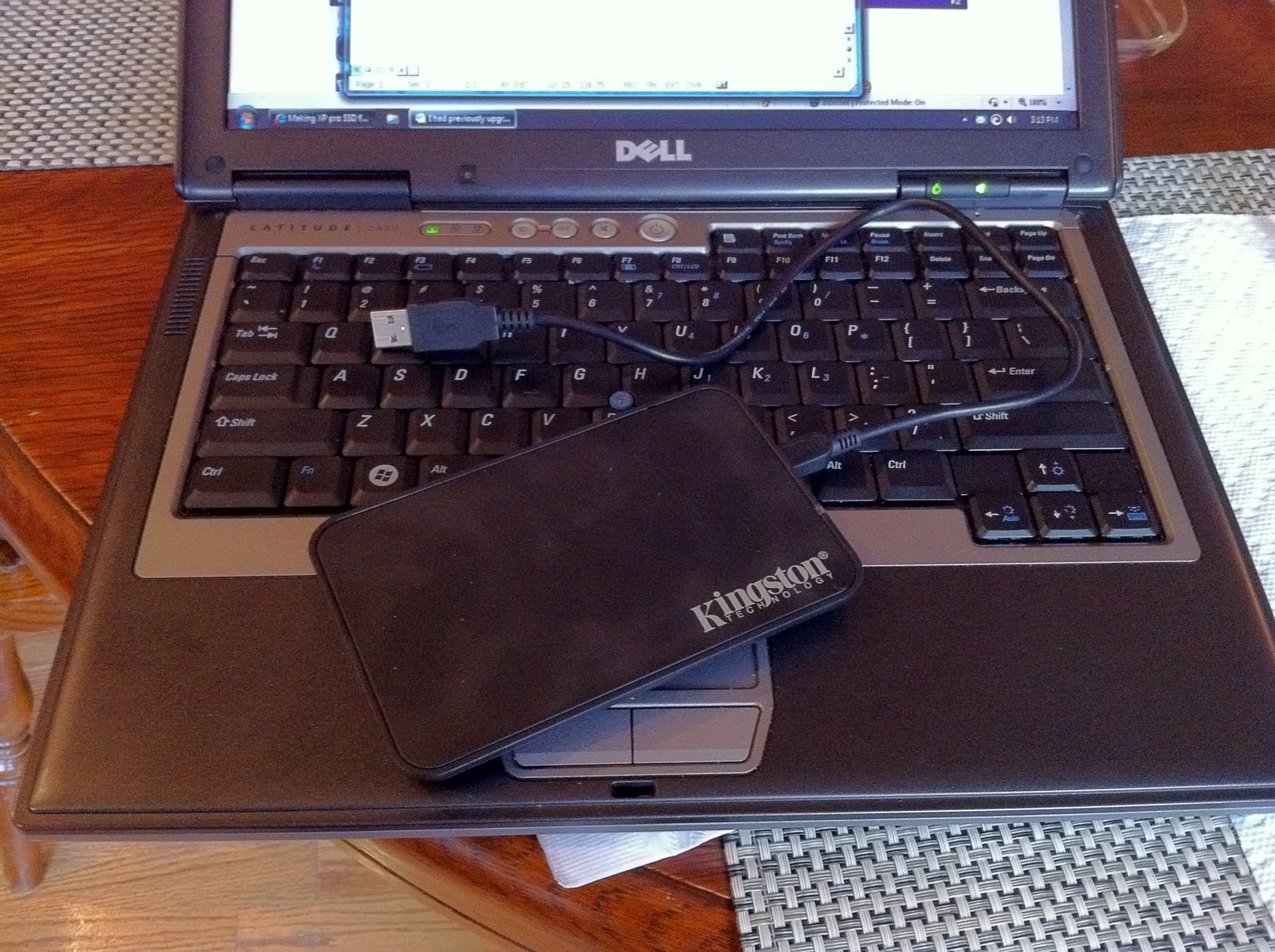
I had previously upgraded my Dell Latitude D630 (Core 2 Duo T7500 with 2GB of ram) to a 500GB 7200rpm SATA hard drive, but when I saw that I could get a 128GB SSD for $200 after rebate at Amazon, I took the solid state plunge. There is a newer version of this drive (the V100) but I decided to save a few dollars and stay off the bleeding edge. I bought the "notebook upgrade kit" which comes with a 2.5” (notebook) sized external USB enclosure.

Installation was straightforward – remove the drive sled, take out two screws, attaché the drive, put the screws in, and slide it back into the laptop. 5 minutes.

I had decided to upgrade from Windows XP to Windows 7 in order to get a clean install and to take advantage of Window 7’s optimized SSD performance (XP has some quirks that need to be worked around if you’re using an SSD). No issues with the Windows 7 install. I moved the old hard drive into the USB enclosure so I could copy my files off later. The enclosure also gives you a place to store data files since the SSD’s size is probably smaller than you’re used to. It's powered by the USB port (no external power supply) and comes with a 12 inch USB cable, but note that not all of my USB ports were powerful enough to operate my old hard drive once I had moved it to the enclosure (presumably a SSD takes less power).

Once it was up and running, I found that the formatted capacity is 119GB. The drive is totally silent. The most immediate difference is the startup and shutdown times. A cold boot takes less than 30 seconds where it used to take more like a minute, and shutdown is in under 15 seconds. The system also feels much more responsive during general usage, things like web browsing and photo editing. Even though this computer is over 2 years old, the addition of an SSD makes it feel like a new machine. Overall, the upgrade was well worth the $200 cost and I’ll definitely look for an SSD in my next computer.

Nov 16, 2010

Photos from the Ft. Worth Alliance Air Show 2010

All photos taken with a Nikon D700 and 16-35mm f/4 or 70-200mm f/2.8 VR at the Alliance airport in Fort Worth, Texas. Full gallery available here.

DSC_3565

DSC_3575

DSC_3596

DSC_3603

DSC_3678

DSC_3786

Nov 11, 2010

Cleaning dust from your DSLR sensor

I never had a problem with dust on my D90’s sensor, but the D700 seems to be a dust magnet. Dust will show up as dark spots on light, even colored areas of your photos taken at small apertures. The blue sky in a landscape is a prime example of where you’ll spot dust. To see exactly how bad your dust is, stop down all the way (f/22 or smaller), set your ISO to 200, and take a picture of a light colored object such that it fills the frame. Something like a well lit piece of paper or a wall will work. It doesn’t need to be in focus and it doesn’t matter if the shutter is slow. Now open this file on your computer and you’ll see all the dust that’s sitting on your sensor. Technically, the dust isn’t on your sensor, it’s on the anti-aliasing filter that sits in front of your sensor.

The easiest cleaning option is to use your camera’s auto cleaning feature, if it has one. Unfortunately, on my D700 this does a poor job of removing most of the dust. Don’t bother trying to use a q-tip or lens brush to clean it off – best case, you’ll just end up smearing dust all over your sensor, worst case, you’ll scratch it and need to send it back to Nikon for a costly repair.

The next step is to use air to blow the dust off. Set your mirror to lock up and then use a Rocketblower from Giotto’s (get the large one) to blast it off. Be careful not to contact the sensor with the blower. Avoid using “canned air” or air from a compressor – the former can contain bitterants and propellants that will condense on your sensor, the latter may be too powerful and could cause misalignment. Make sure you have a full battery before you start this – if it dies while you’re cleaning, the mirror will spring back into place and you can easily scratch the sensor or the mirror (this also applies to the swab cleaning).

There may be some dust that resists your first two attempts to remove it, in which case you need to use a wet cleaning. I recommend the cleaning swabs and solution from Photographic Solutions. Make sure to get the swabs that fit your sensor size (full frame or DX). You apply a couple of drops to the swab and then work it across the sensor. Don't be afraid to put some pressure on the swab - the sensor can take it - and you'll need it to get stubborn particles off. After the first attempt, take a test shot and check the results. Don't use a swab for more than 2 minutes after you apply the solution as it starts to break the fibers down, and never re-use a swab once you've set it down somewhere as it will pick up debris. It may take a couple of tries to get all the dust off - be careful not to pick up new dust from the edge of the camera housing as you use the swab.

Overall, this can be a nerve wracking experience the first time you do it, but it's really not that bad once you get the hang of it and follow the instructions. If you’re in Dallas or Ft. Worth, head over to Arlington Camera and they’ll clean your sensor for $60 plus the cost of swabs ($5/each). They’ll also show you what they’re doing so you can do it yourself next time.

Sep 20, 2010

Plano Balloon Festival 2010

Here's a couple of nighttime photos from the Plano Balloon Festival in Texas. This is a great event - I didn't get up early enough for the morning launch, but I did catch the evening one. However, the best photo opportunities were during the "glow" after the sun went down. They let spectators walk amongst the balloons before clearing them out for fireworks. More shots at my Flickr set.

These were all taken with a Nikon D700 plus 24-70mm and 70-200mm VR lenses.

DSC_2135

DSC_2343

DSC_2326

DSC_2206

DSC_2157

DSC_2213

Mar 21, 2010

Nikon 70-200mm f/2.8 VR and VRII: Old Versus New

Nikon reinvented a classic when it developed the 70-200mm VRII. But how does it compare to the original?

The VRII is slightly heaver, and feels it since the barrel is wider. I appreciate the fact that the VRII is half an inch shorter as it fits better in my Lowepro Fastpack 250; the VRI was pushing the length dimension of my bag's capacity. Neither will fit with the hood installed but you can leave it reversed. By virtue of being shorter and wider, the VRII has less of a "baseball bat" feel to it when installed on a smaller dSLR like the D90.

On my DX camera (Nikon D90) it's hard to say that the VRII has improved image quality. They're both extremely sharp, contrasty lenses. Other reports are that the difference on FX is noticeable - the corners are supposed to be much better on the VRII.

However, autofocus and vibration reduction are noticeably improved on the VRII. These are features that you'll appreciate even even if you're shooting on DX. Plus, the VRII paves the way for a future upgrade to FX.

Overall, there's no question that the VRII is the lens to get if you have a full frame camera, and it's probably justified on a crop sensor camera as well. The picture below shows them side by side.

Mar 12, 2010

The best tailor in Dallas: Cantu Tailors

If you need a tailor who knows what he's doing, Cantu is the place. This is a great family run business that's been around for decades. Robert is always helpful and the prices are fair (yes, there are cheaper tailors, but you get what you pay for). Located in an unassuming strip mall, the storefront isn't much to look at but the work is always first rate.

(214) 739-3190
6064 Sherry Ln
Dallas, TX 75225